Menambahkan :
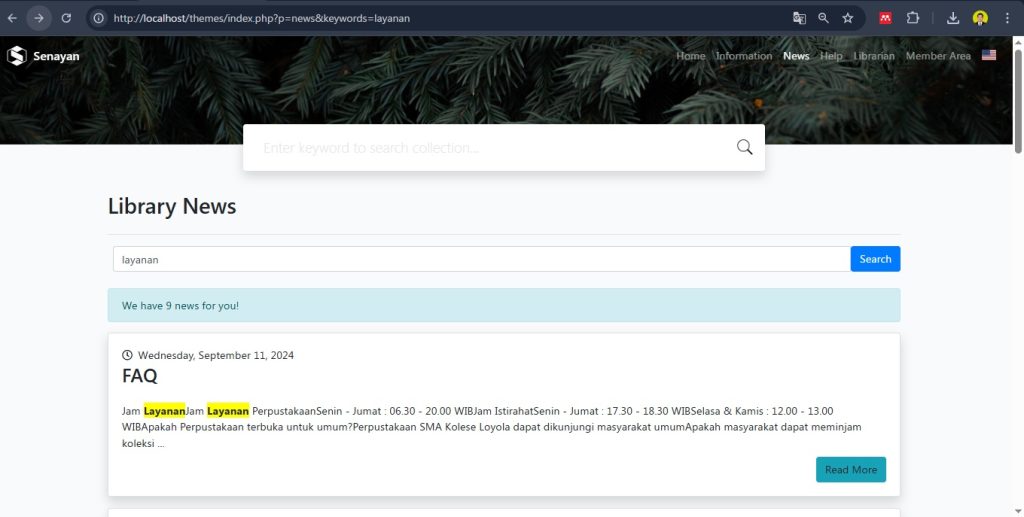
- Kotak pencarian berita berdasarkan judul atau kata kunci pada deskripsi berita
- Menambahkan warna stabilo kuning (hightlight) pada kata kunci yang dicari
Caranya cukup mudah, replace code yang ada di lib/content/news.inc.php dengan kode dibawah ini
code lengkap:
<?php

/**
 * Copyright (C) 2015, Arie Nugraha (dicarve@gmail.com)
 * Modified by Erwan Setyo Budi (erwans818@gmail.com)
 * This program is free software; you can redistribute it and/or modify
 * it under the terms of the GNU General Public License as published by
 * the Free Software Foundation; either version 2 of the License, or
 * (at your option) any later version.
 *
 * This program is distributed in the hope that it will be useful,
 * but WITHOUT ANY WARRANTY; without even the implied warranty of
 * MERCHANTABILITY or FITNESS FOR A PARTICULAR PURPOSE.  See the
 * GNU General Public License for more details.
 *
 * You should have received a copy of the GNU General Public License
 * along with this program; if not, write to the Free Software
 * Foundation, Inc., 51 Franklin Street, Fifth Floor, Boston, MA  02110-1301  USA
 *
 */

require_once LIB.'content.inc.php';
require SIMBIO.'simbio_GUI/paging/simbio_paging.inc.php';
require_once SB.$sysconf['template']['dir'].'/'.$sysconf['template']['theme'].'/news_template.php';

$opac->page_title = __('Library News');

$keywords = null;
if (isset($_GET['keywords'])) {
  $keywords = trim($_GET['keywords']);
}

// Label tombol cari (multi-bahasa)
$searchLabel = __('Search');

// Form pencarian
echo <<<HTML
<form class="mb-4" method="get" action="index.php">
  <input type="hidden" name="p" value="news">
  <div class="input-group">
    <input type="text" class="form-control" placeholder="Cari berita berdasarkan kata kunci..." name="keywords" value="{$keywords}">
    <button class="btn btn-primary" type="submit">{$searchLabel}</button>
  </div>
</form>
HTML;

$content = new Content();
$total = 0;
$content_list = $content->getContents($dbs, 10, $total, $keywords);

if ($total > 0) {
  echo '<div class="alert alert-info">'.__(sprintf('We have %d news for you!', $total)).'</div>';
} else {
  echo '<div class="alert alert-warning">'.__('Sorry, we don\'t have any news for you yet.').'</div>';
}

// Tampilkan daftar berita dengan class highlight
foreach ($content_list as $c) {
    $summary = Content::createSummary($c['content_desc'], 300);
    echo '<div class="highlight">';
    echo news_list_tpl($c['content_title'], $c['content_path'], $c['publish_date'] ?? $c['last_update'], $summary);
    echo '</div>';
}

// Paging
echo simbio_paging::paging($total, $sysconf['news']['num_each_page'], 5);

// Tambahkan highlight keyword jika ada
if ($keywords) {
?>
<!-- CSS untuk highlight dan pastikan teks tetap hitam -->
<style>
  .highlight {
    color: inherit !important;
  }

  .highlight * {
    color: inherit !important;
  }

  .highlight-keyword {
    background-color: yellow;
    color: inherit;
    font-weight: bold;
  }
</style>

<script>
  document.addEventListener("DOMContentLoaded", function() {
    const keyword = <?php echo json_encode($keywords); ?>;
    const highlight = (text, keyword) => {
      const pattern = new RegExp(`(${keyword.replace(/[-\/\\^$*+?.()|[\]{}]/g, '\\$&')})`, 'gi');
      return text.replace(pattern, '<span class="highlight-keyword">$1</span>');
    };

    document.querySelectorAll('.highlight').forEach(el => {
      el.innerHTML = highlight(el.innerHTML, keyword);
    });
  });
</script>
<?php
}
?>
Hasil
Semoga Bermanfaat.
Salam, Erwan Setyo Budi.

